Started with a locked-down UART port that refused shell access. Ended with full firmware extraction and persistent flash modification on a BCM3383-based cable modem. Along the way: custom MIPS shellcode, bootloader reverse engineering, and a few hours wasted probing the wrong peripheral because I trusted documentation.
Spoiler: the documentation lied.
Target: Hitron BDN-1103WL (BCM3383G-B0 DOCSIS 3.0 SoC)
What I got:
- Arbitrary code execution via bootloader debug commands
- Full 8MB SPI flash extraction over UART (~25 minute download time at 115200 baud LOL)
- Persistent flash modification (bootkit proof-of-concept)
- Complete CFE bootloader reverse engineering
A Note on Responsible Disclosure
This device is 14 years old (firmware dated 2012). The BCM3383 chipset reached end-of-life years ago and isn’t deployed in production cable networks anymore. Modern DOCSIS 3.1/4.0 infrastructure uses completely different hardware with secure boot, signed firmware, and locked-down bootloaders.
Publishing this for educational purposes: embedded security concepts, MIPS shellcode development, bootloader exploitation techniques on obsolete hardware. No risk to current cable infrastructure.
If you somehow still have one of these in production… you have bigger problems.
Target Hardware
| Component | Details |
|---|---|
| SoC | Broadcom BCM3383G-B0 DOCSIS 3.0 |
| CPU | MIPS32 @ 637.2 MHz |
| RAM | 128 MB DDR2 $$$ |
| Flash | Macronix MX25L6405D, 8MB SPI NOR |
| Bootloader | CFE 2.4.0alpha14 (March 28, 2012) |
| OS | eCos RTOS with Broadcom BFC |
Act 1: The Locked Door
Cracked open the case expecting to spend an afternoon hunting for test points. Instead, a 4-pin UART header sitting right there on the board, already populated. Thanks, Hitron.
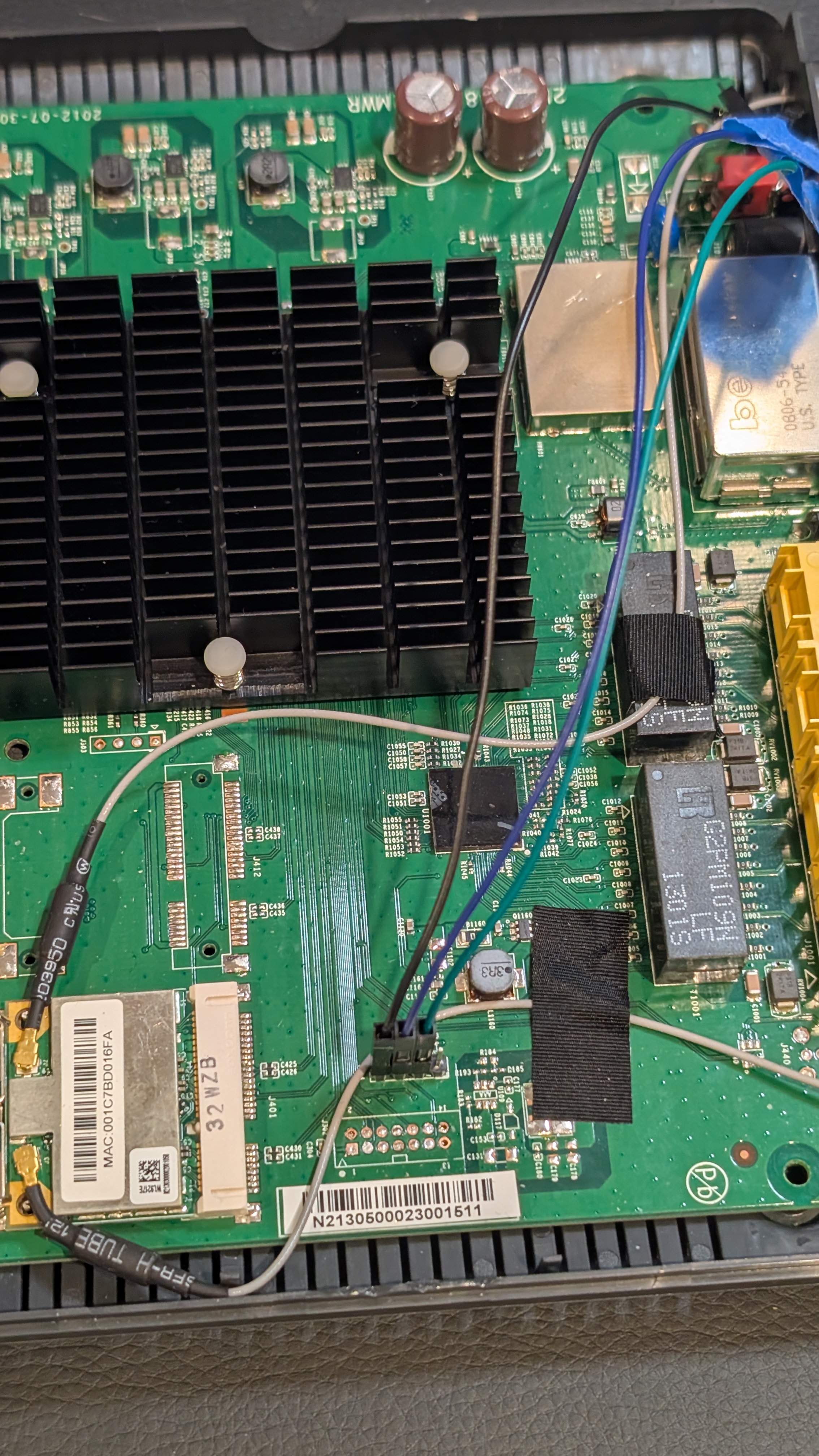 Pinout: 1 - GND, 2 - RX, 3 - TX, 4 - Vcc 3.3V
Hooked up a USB-to-serial adapter, 115200 baud, and the device boots, shows a login prompt over UART, and… nothing. No default credentials work. The shell is locked down.
But during boot, a brief message flashes by: “Press ‘p’ to enter bootloader menu.”
The CFE (Common Firmware Environment) bootloader presents a debug menu:
+============================================================+
|                   CFE Debug Console                        |
+============================================================+
| Board IP Address  [192.168.100.1]:                         |
| Board IP Mask     [255.255.255.0]:                         |
| Board IP Gateway  [0.0.0.0]:                               |
| Board MAC Address [00:10:18:ff:ff:ff]:                     |
+------------------------------------------------------------+
|  Main Menu:                                                |
|    b) Boot from flash                                      |
|    g) Download and run from RAM (TFTP)                     |
|    d) Download and save to flash                           |
|    e) Erase flash sector                                   |
|    m) Set mode                                             |
|    s) Store bootloader parameters to flash                 |
|    i) Re-init ethernet                                     |
|    r) Read memory                                          |
|    w) Write memory                                         |
|    j) Jump to address (execute)                            |
|    X) Erase all of flash (except bootloader)               |
|    z) Reset                                                |
+============================================================+
That w + j combination is the key. Write shellcode to RAM, jump to it, get arbitrary code execution. No shell required. And since this is all over a serial port, I can programmatically hammer the shit out of these commands with Python scripts and MIPS shellcode, which is exactly what I did.
The front door was locked. But someone left the maintenance hatch wide open.
Act 2: First Blood
Payload #1: Write 0xCAFEBABE (random hexspeak value) to memory, read it back.
Main Menu: w           # write to memory
Write memory.

Address: 81000000      # my input
Value: CAFEBABE        # my input

Main Menu: r           # read from memory
Read Memory.

Address: 81000000      # my input
Value at 81000000: CAFEBABE
It worked, I have write-what-where AND read primitives.
Simple enough, right? I can read and write 4 bytes to pretty much any mapped memory address. I’ll just have a python script that enters the character directives w for writes, r for reads. Call this over and over again and I can sling a LOT of shellcode over, or read entire memory regions and start reverse engineering in-memory code.
Payload #2: Get output somehow. I needed to print data over UART, but had no idea what functions existed or where they lived. Tried a few guesses based on common bootloader patterns: nothing. No output. Lots of spraying and praying, and crashing and burning.
Payload #3: Screw it, direct UART register manipulation. Found some register references in online BCM3383 notes, guessed at offsets, scanned peripheral memory regions, reverse engineered register layouts, and iterated until something worked. Eventually landed on 0xB4E00500, status at +0x12, TX at +0x17. Whipped up some quick UART graffiti shellcode:
Console output:
*** LOL CURT WUZ HERE ***
I had output. This UART graffiti shellcode quickly became a re-purposeable gadget used to dump flash and later RAM.
Act 3: The 32KB Prison
Before dumping flash, I needed to figure out what memory was even accessible.
The Crash Screen
I got real familiar with this one. Any bad memory access produced a full register dump:
******************** CRASH ********************

EXCEPTION TYPE: 7/Bus error (load/store)
TP0
r00/00 = 00000000 r01/at = 83f90000 r02/v0 = a0010000 r03/v1 = 00000001
r04/a0 = 00000000 r05/a1 = 00000000 r06/a2 = a0010000 r07/a3 = 00000000
r08/t0 = b0000000 r09/t1 = 00000000 r10/t2 = 00000029 r11/t3 = 0000003a
r12/t4 = 20000000 r13/t5 = 000000a8 r14/t6 = 00000000 r15/t7 = 00000000
r16/s0 = b4e00500 r17/s1 = b0000000 r18/s2 = 00000000 r19/s3 = 0337f980
r20/s4 = 00010000 r21/s5 = 00008000 r22/s6 = 00100010 r23/s7 = 0000bfa4
r24/t8 = 00000002 r25/t9 = 00001021 r26/k0 = 1dcd6500 r27/k1 = 0337f980
r28/gp = 9fc00778 r29/sp = 87ffff20 r30/fp = 00000215 r31/ra = a0010060

pc   : 0xa0010068              sr  : 0x00000002
cause: 0x0000801c              addr: 0x00000000
Note r08/t0 = b0000000, the address I tried to access. This screen meant instant reboot and forced power cycle to restart. I saw it many times, but the full register state dump was actually paramount for debugging: you get the complete CPU state at the moment things went wrong.
Mapping Memory
To map accessible regions, I used the r command to probe addresses, halving the search space on each crash:
Initial probe: 0xBFC00000  → OK (flash window exists)
Probe high:    0xBFCFFFFF  → CRASH
Binary search: 0xBFC80000  → CRASH
               0xBFC40000  → CRASH
               0xBFC20000  → CRASH
               0xBFC10000  → CRASH
               0xBFC08000  → CRASH
               0xBFC04000  → OK
               0xBFC06000  → OK
               0xBFC07000  → OK
               0xBFC07FFF  → OK (last valid address)
               0xBFC08000  → CRASH

Result: Flash window is exactly 32KB (0xBFC00000-0xBFC07FFF)
The device has 8MB of SPI flash, but I could only see a tiny 32KB window. Not great.
“Just access the SPI controller directly,” I thought. Every datasheet pointed to 0xB0000000.
Bus error, crash, power cycle, try again. Tried different access patterns, different sizes, different alignments: nothing but ** CRASH ** register dumps over and over for hours.
I dumped the 32KB I could see. It was just a first-stage loader that decompresses the real bootloader into RAM. The actual CFE runs from 0x83F80000.
Act 4: The RAM Dump Revelation
If CFE runs from RAM, I could dump it directly. A fast binary dump payload reusing our graffiti shellcode from earlier extracted 256KB of the running bootloader.
Loaded it into Binary Ninja. Struggled to get clean disassembly; Binary Ninja’s MIPS support is rough. Switched to Ghidra, which handled it fine.
I spent a while in Ghidra tracing through the code, searching for flash-related strings like “SPI”, “flash”, “read”, “write” and following call graphs and register accesses through a bunch of candidates.
First discovery: CFE doesn’t use 0xB0000000 at all. It uses HSPI at 0xB4E01000, a completely different peripheral that isn’t in any datasheet I found. All those hours crashing on 0xB0000000… FFFUUUU-. The answer was in the code the whole time.
Second discovery: two functions that do all the flash work:
SpiFlashReadat0x83F810A0SpiFlashWriteat0x83F80EC4
I reversed their calling conventions: standard MIPS, arguments in $a0-$a2, return value in $v0. These were the keys.
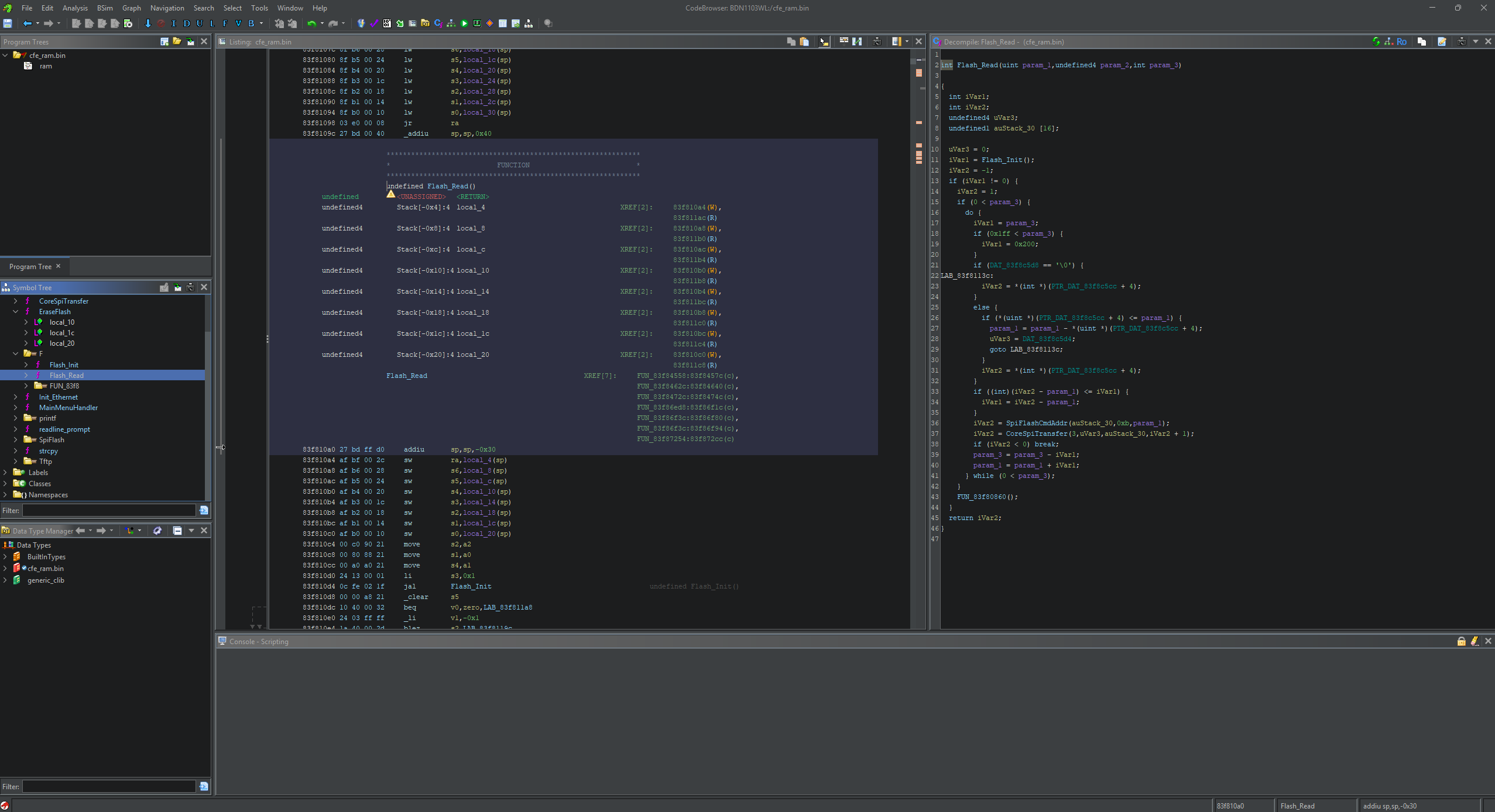 ghidra screenshot with minimal context and cryptic MIPS code
Quick probe payload to verify HSPI was accessible from my shellcode context:
=== HSPI Probe (0xB4E01xxx) ===
B4E01000: 000F0000
B4E01008: 00000001
B4E01080: 00002001
B4E01088: 80008000
=== HSPI accessible! ===
I had flash access.
Act 5: Using Their Own Tools
With the functions identified, I could either reverse engineer the HSPI register protocol myself, or… just call what CFE already has. The flash routines are sitting right there in RAM, ready to use.
int SpiFlashRead(uint32_t flash_offset, void *dest, uint32_t length);
My payload just calls them.
Act 6: Full Extraction
Final payload: 5-second countdown to start capture, then loop SpiFlashRead(offset, buffer, 256), convert to hex, spit it out over UART. Repeat until 8MB extracted.
25 minutes later:
Binary size: 8,388,608 bytes
SHA256: c9526cbcdf0113eeab74c413c09a7ff2aaee55f1a1e658812d072fc396ced039
All 8 megabytes of firmware, extracted through a serial port via repurposed chained bootloader function calls.
Act 7: Persistence
Extraction is nice. But can I write?
SpiFlashWrite lives at 0x83F80EC4. Same calling convention, so I targeted a version string at flash offset 0x122C8.
Result: Write succeeded but data was garbled, likely alignment or page boundary issues. Still proves I can write to flash. Refinement needed for clean writes.
Point is: persistent firmware modification via shellcode injected through UART works.
The Memory Map
Binary search probing gave me the accessible regions:
| Address Range | Description |
|---|---|
0x80000000-0x87FFFFFF |
RAM (128MB, KSEG0 cached) |
0xA0000000-0xA7FFFFFF |
RAM (KSEG1 uncached mirror) |
0xB0000000 |
SPI Controller (LOCKED, red herring) |
0xB4E00500 |
UART |
0xB4E01000 |
HSPI Controller (the real flash interface) |
0xBFC00000-0xBFC07FFF |
Flash window (only 32KB visible) |
Shellcode
MIPS has quirks. Delay slots execute regardless of branch taken. Nested bal calls clobber $ra. Stuff that bit me:
UART Output
putchar:
    lhu     $t0, 0x12($s0)    # Read UART status
    andi    $t0, $t0, 0x20    # TX ready bit
    beqz    $t0, putchar      # Spin until ready
    nop
    sb      $a0, 0x17($s0)    # Write byte to TX register
    jr      $ra
    nop
Calling CFE Functions
# SpiFlashRead(offset, dest_buffer, length)
    li      $a0, 0x000000     # Flash offset
    la      $a1, buffer       # Destination
    li      $a2, 256          # Length
    li      $t0, 0x83F810A0   # SpiFlashRead address
    jalr    $t0               # Call it
    nop
Stack Discipline
Save your return address or die:
_start:
    addiu   $sp, $sp, -64     # Allocate frame
    sw      $ra, 60($sp)      # Save return address
    sw      $s0, 56($sp)      # Save callee-saved regs
    # ... do work ...
    lw      $s0, 56($sp)      # Restore
    lw      $ra, 60($sp)
    addiu   $sp, $sp, 64      # Deallocate
    jr      $ra               # Return to CFE
    nop
Mistakes Made
The SPI Red Herring
I spent hours probing 0xB0000000 and every attempt crashed; the real controller was at 0xB4E01000 the whole time.
Trusting CFE’s Print Functions
After dumping CFE from RAM, I thought I could just call printf directly. Nope. Expected global state I didn’t have. Stuck with my own UART routines.
Register Clobbering
All my helper functions saved $ra to $t9. Nested calls overwrote it. Added proper stack frames.
TFTP Complexity
Tried to use CFE’s TFTP download command for cleaner payload loading, but it needed Broadcom ProgramStore headers with HCS checksums and I gave up. Direct RAM write + jump was simpler and worked fine.
Tools Developed
| Tool | Purpose |
|---|---|
inject_payload.py |
Write shellcode to RAM, jump to execute |
dump_bootloader.py |
Automate memory reading via r command |
parse_flash_dump.py |
Convert hex dump to binary |
Payloads
| Payload | Purpose | Status |
|---|---|---|
test_simple.S |
Write magic value, verify execution | Works |
graffiti.S |
Print message via UART | Works |
flash_dump_uart.S |
Dump 32KB flash window | Works |
cfe_dump_uart.S |
Fast binary dump of CFE from RAM | Works |
probe_hspi.S |
Verify HSPI accessibility | Works |
flash_dump_full.S |
Full 8MB extraction via SpiFlashRead | Works |
bootkit_poc.S |
Persistent flash modification | Partial |
Where I Ended Up
- Arbitrary code execution from locked-down UART
- Full 8MB firmware extraction
- Complete CFE reverse engineering
- Flash read/write capability
- Persistent modification works
Attack Surface Expanded
A locked UART turned into:
- Full firmware access for analysis
- Ability to patch firmware
- Bootkit/rootkit potential
- Complete device compromise from “minimal” serial access
The Punchline
After boot completes, the firmware proudly announces:
Console input has been disabled in non-vol.
Console output has been disabled in non-vol!  Goodbye...
The shell is locked. No login will work. Job done, I guess.
Except press p during the 2-second boot window, and you get an unauthenticated debug menu with:
- Full memory read/write
- Arbitrary code execution
- Flash erase and program capabilities
- Network boot (TFTP)
The firmware spent effort disabling the shell. The bootloader left the keys under the mat.
What they did:
- Disabled serial console login
- Checksums on firmware images
What they forgot:
- Left debug bootloader enabled
- No authentication on bootloader menu
- No secure boot chain
A locked front door means nothing if you leave the maintenance hatch open.
Takeaways
- Simple beats complex:
w+jbeat TFTP with checksums - Trace real execution: documentation lies; code doesn’t
- Dump everything: RAM often contains more than flash
- Reuse existing code: CFE’s functions work from shellcode
- Test incrementally: magic values → characters → strings → dumps
- Stack frames matter: proper calling conventions prevent crashes
- Trust NO ONE, not even the documentation: the obvious peripheral was wrong
Press ‘p’ to pwn